From Install to Impact: How SecurityBridge Gets You Securing SAP from Day One

Chapters
Share Article
Let's Talk SAP Security
Have questions about SAP Security? We’re here to help. Contact Us
Most security tools promise results in months. SecurityBridge delivers visibility, threat detection, and a clear security roadmap within days of installation – without a lengthy implementation project.
If you have ever evaluated enterprise security software, you know the pattern: a long scoping phase, months of implementation, extensive consultant hours, and then finally a go-live date that is further away than you originally hoped. For SAP security in particular, this cycle can feel inevitable. SAP landscapes are complex, and security tools often reflect that complexity in their deployment.
SecurityBridge was built with a fundamentally different philosophy. The platform is designed so that your team gains meaningful, actionable security insight immediately after installation, not after a quarter of configuration work. This article walks through exactly what that looks like in practice, module by module.
Why Time-to-Value Matters in SAP Security
The window between the moment a vulnerability exists and the moment it is exploited continues to shrink. Attackers do not wait for implementation projects to finish. Every week that your SAP landscape runs without proper threat detection, patch visibility, or compliance monitoring is a week of unquantified risk.
There is also an organizational dimension. Long implementation timelines create fatigue. Stakeholder enthusiasm diminishes. Budget scrutiny increases. A security tool that demonstrates real value within days earns the trust and internal sponsorship it needs to be used properly, which ultimately drives security improvement.
SecurityBridge was architected to solve both problems at once.
What Happens Right After You Install
SecurityBridge operates as a native SAP application, which means there is no external infrastructure to stand up, no network architecture to redesign, and no data to export to an outside platform. Once installed, five core capabilities come online simultaneously.
1.Threat Detection Monitor – Know What Is Happening in Your Environment
The first thing most customers do after installing is activate the Intrusion Detection System. The reason is simple: before you can improve security, you need to understand your current reality. The Threat Detection Monitor immediately begins surfacing which processes are running, which actions are being performed, and, critically, is unusual.
SecurityBridge’s Anomaly Detection engine automatically identifies statistical outliers, so your team is not starting from a blank canvas. Early on, you will encounter “(un)known unknowns” – activities you did not realize were happening. That discovery is exactly the point. With a clear picture of what is normal, you can begin tuning the configuration and elevating the accuracy of future detections. Findings can be converted directly into incidents, making the path from detection to remediation straightforward.
2. Security & Compliance Monitor – See Your AS-IS Situation Immediately
One of the most common reactions from new SecurityBridge customers is: “We didn’t know it was this bad.” That is not a failure – it is the system working as intended. Immediately after installation, the Security & Compliance Monitor presents an unfiltered view of your current security posture, including a standard baseline that classifies vulnerabilities by both Exploitation Risk and Resolution Complexity.
This dual classification is what makes the data actionable rather than overwhelming.
You do not need to fix everything at once – 100% security does not exist and never will. What SecurityBridge gives you is a prioritized roadmap: a structured, evidence-based sequence for tackling the risks that matter most, starting from your very first week.
3. Patch Management – Close the Most Critical Gaps First
Security patching is the foundation of SAP security hygiene, and many organizations are further behind than they realize. SecurityBridge detects missing security updates instantly and with high accuracy, and immediately prioritizes them by CVSS score – so your team knows exactly where to focus.
The recommended approach is straightforward: start with Hot News and Very High-severity notes, work down from there, and establish a monthly review cadence to track patching status. Applying all Hot News SAP security notes alone represents a significant and measurable improvement to your security posture – and SecurityBridge makes it possible to identify and track this within days of going live.
4. Interface Traffic Monitor – Map and Harden Your Attack Surface
System-to-system communication is a frequently overlooked attack vector in SAP landscapes. The Interface Traffic Monitor provides immediate visibility into which connections exist, which paths are critical, and which could be exploited by an attacker moving laterally – for example, from a development system into production.
Understanding your interface landscape is a prerequisite for hardening your entire SAP environment. SecurityBridge gives you that understanding from day one, alongside analysis of critical access paths, so your team can prioritize RFC destination hardening and monitor data downloads immediately.
5. Code Security – Find Vulnerabilities in Custom Development
Most SAP product vulnerabilities have their root cause in code, and the same is true of custom-developed ABAP in most organizations. SecurityBridge scans your code base and surfaces high-severity vulnerabilities, so you know where the risk is concentrated, especially in frequently used code.
Beyond remediation, SecurityBridge integrates with SAP-ATC to help developers write secure code by design, going forward – shifting security left into the development process itself. This capability can be activated immediately after installation, embedding security into every developer’s workflow on your team.
What Your First 30 Days Actually Look Like
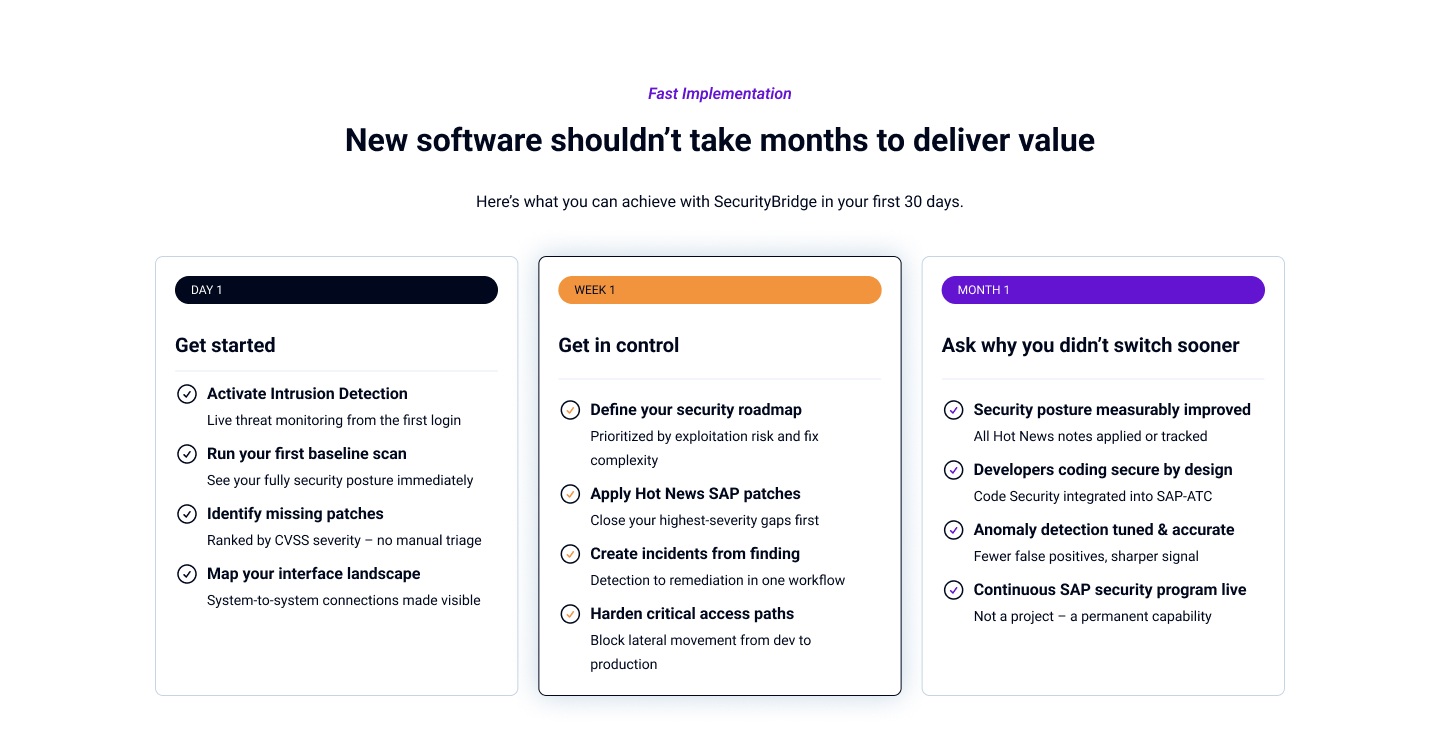
The pace of value delivery with SecurityBridge is genuinely different from what most SAP security teams expect. Here is a realistic picture:
Day 1: Installation complete. Event Monitor active. Intrusion Detection System live. First baseline scan results visible in the Security & Compliance Monitor.
Week 1: Team reviews initial event data and baseline findings. Missing security patches identified and ranked by severity. Interface landscape mapped. First incidents created from high-priority findings.
Month 1: Security roadmap being executed. Hot News patches applied or in progress. Anomaly detection tuned for your environment. Developers onboarded to Code Security scanning. Security embedded in regular operations – not treated as a one-off project.
None of this requires a large professional services engagement. SecurityBridge’s partner network is available for organizations that want additional guidance – particularly around security remediation, governance, and managed services – but the platform itself is designed to be operational and generate value from day one, with your own team.